

SIM800 GSM GPRS Module SIM900A Upgraded Development Board with Voice Call

Order before 12.00PM
Features:
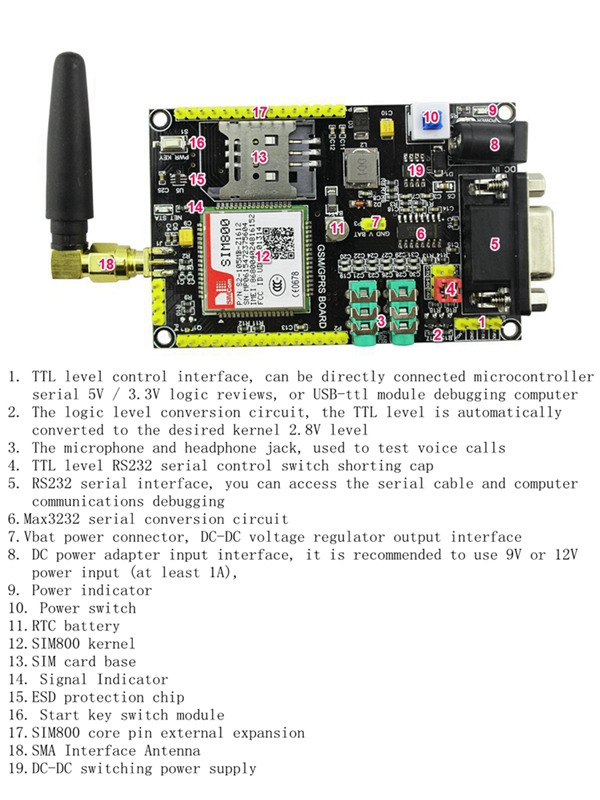
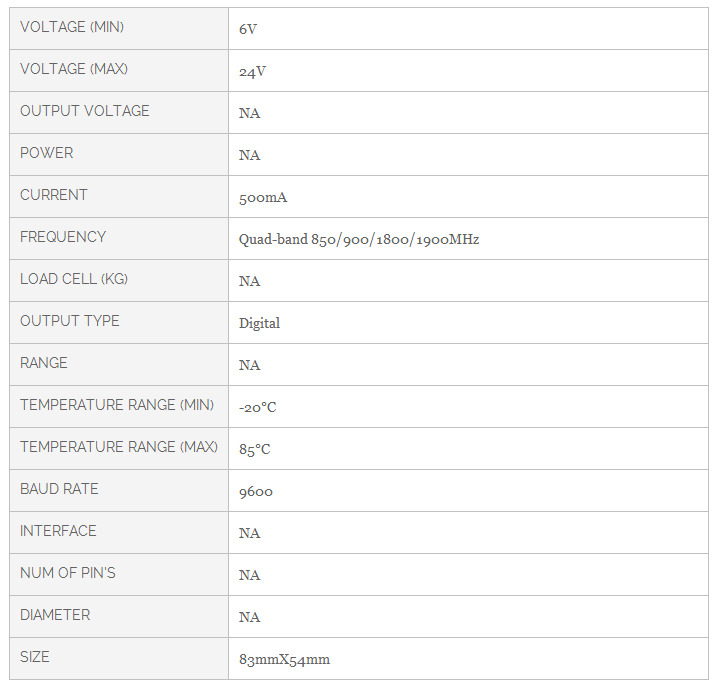
- DC6-24v wide voltage power supply, can also conveniently used in conjunction with your system power. Board high performance DC-DC power supply circuit, plus TVS protection, the system is greatly enhanced stability.
- Support 3.3V / 5V TTL level control, convenience and variety of commonly used microcontrollers, such ARDUINO / 51 / STM32 and other communications Modules listed separately TX / RX / GND, and easy to use.
- With a standard serial interface, easy to use PC control or debugging.
- With headphone and microphone interface, easy to test GSM voice calls.
- SIM card with a chip static protection, static electricity generated when the SIM card plug for protection .
- All pins are available SIM800 go out, so you can develop applications for a variety of SIM800.
- RTC with battery backup.
- With NET_STA indicator for easy viewing of the current status of SIM800.


Specification
- TGPRS class 12: max. 85.6 kbps (downlink/uplink)
- PBCCH support
- Coding schemes CS 1, 2, 3, 4
- PPP-stack
- CSD up to 14.4 kbps
- USSD
- Non transparent mode
- Specifications for SMS via GSM/GPRS
- Point to point MO and MT
- SMS cell broadcast
- Text and PDU mode
Package list
- SIM800 GSM/GPRS Module x 1
How to interface with an Arduino?
Interfacing a SIM800 or SIM900 GSM/GPRS module with an Arduino involves connecting the module to the Arduino and writing code to communicate with it. Here’s a step-by-step guide:
1. Hardware Connections
Pin Connections:
-
Power Supply:
- SIM800/900 VCC: Connect to a stable 5V or 4.2V power supply (depending on module specifications). These modules can draw up to 2A during transmission, so using an external power supply is often necessary.
- GND: Connect to Arduino GND.
-
Serial Communication:
- SIM800/900 TX (Transmit): Connect to Arduino RX (Digital Pin 0).
- SIM800/900 RX (Receive): Connect to Arduino TX (Digital Pin 1). If you are using a 5V Arduino, you may need a level shifter to step down the 5V to 3.3V for the RX pin of the module.
-
Additional Pins:
- RST (Reset): Connect to an Arduino digital pin if you plan to control the module's reset function.
- KEY (Key): Connect to 3.3V or leave unconnected unless needed for specific functions.
2. Code Example
Here’s a basic example to send an SMS using the SIM800/SIM900 module:
#include <SoftwareSerial.h>

// Create a software serial port to communicate with the SIM800 module
SoftwareSerial sim800(7, 8); // RX, TX

void setup() {
  // Start serial communication with the PC
  Serial.begin(9600);
  // Start serial communication with the SIM800 module
  sim800.begin(9600);

  // Give some time for the module to initialize
  delay(1000);

  // Send an SMS
  sendSMS("Your message here", "+1234567890"); // Replace with your message and recipient number
}

void loop() {
  // Nothing to do here
}

void sendSMS(String message, String number) {
  // Set SMS mode to text
  sim800.println("AT+CMGF=1");
  delay(500);

  // Set the recipient number
  sim800.print("AT+CMGS=\"");
  sim800.print(number);
  sim800.println("\"");
  delay(500);

  // Send the message
  sim800.println(message);
  delay(500);

  // End the message with Ctrl+Z
  sim800.write(26);
  delay(500);

  // Print confirmation to the serial monitor
  Serial.println("SMS sent");
}
3. Testing
- Power Up: Connect the power supply to the SIM800/900 module.
- Upload Code: Upload the above code to the Arduino.
- Monitor Output: Open the Serial Monitor in the Arduino IDE to view debug messages. The module should send an SMS to the specified number.
4. Troubleshooting
- No Response: Ensure the module has adequate power. Check connections and ensure the baud rate matches.
- SMS Not Sent: Verify that the SIM card is properly inserted and has SMS capabilities. Ensure that the network signal is adequate.
Additional Tips
- Power Considerations: GSM modules can draw significant current, especially when transmitting. A dedicated power supply may be necessary.
- AT Commands: Familiarize yourself with AT commands for more advanced functions like making calls or checking signal strength.
Recently viewed products
You might also be interested in...
Customers who bought this also bought...
General Questions
-
What is the latest price of the SIM800 GSM GPRS Module SIM900A Upgraded Development Board with Voice Call in Bangladesh?
The latest price of SIM800 GSM GPRS Module SIM900A Upgraded Development Board with Voice Call in Bangladesh is Special Price BDT 2,450.00 Regular Price BDT 3,580.00 . You can buy the SIM800 GSM GPRS Module SIM900A Upgraded Development Board with Voice Call at the best price on BDTronics.com or contact us via phone.
-
Where to buy SIM800 GSM GPRS Module SIM900A Upgraded Development Board with Voice Call in Bangladesh?
You can buy SIM800 GSM GPRS Module SIM900A Upgraded Development Board with Voice Call online by ordering on BDTronics.com or directly collect by visiting our store in person. BDTronics is a trusted provider of high-quality electronics, 3D printers, solar systems, and robotics parts. We offer fast shipping across the country via courier service.
-
What are the delivery options of SIM800 GSM GPRS Module SIM900A Upgraded Development Board with Voice Call in Bangladesh?
We provide home delivery service all over Bangladesh. We support Cash on Delivery, Online Bank Transfer, bKash and Credit Card (Visa/ MasterCard/ Amex) payment solutions. The delivery time usually takes 1-2 days inside Dhaka and 2-4 days outside Dhaka.